Indexability Signals for Generative Engines: Eliminating Accidental noindex and Header Dropouts
A page can load normally for visitors while HTTP headers or meta tags tell search crawlers not to index it. How to audit noindex directives, resolve conflicts with robots.txt, and ensure AI engines can index and cite your public pages.
By J. Pannu · · 9 min read
TL;DR
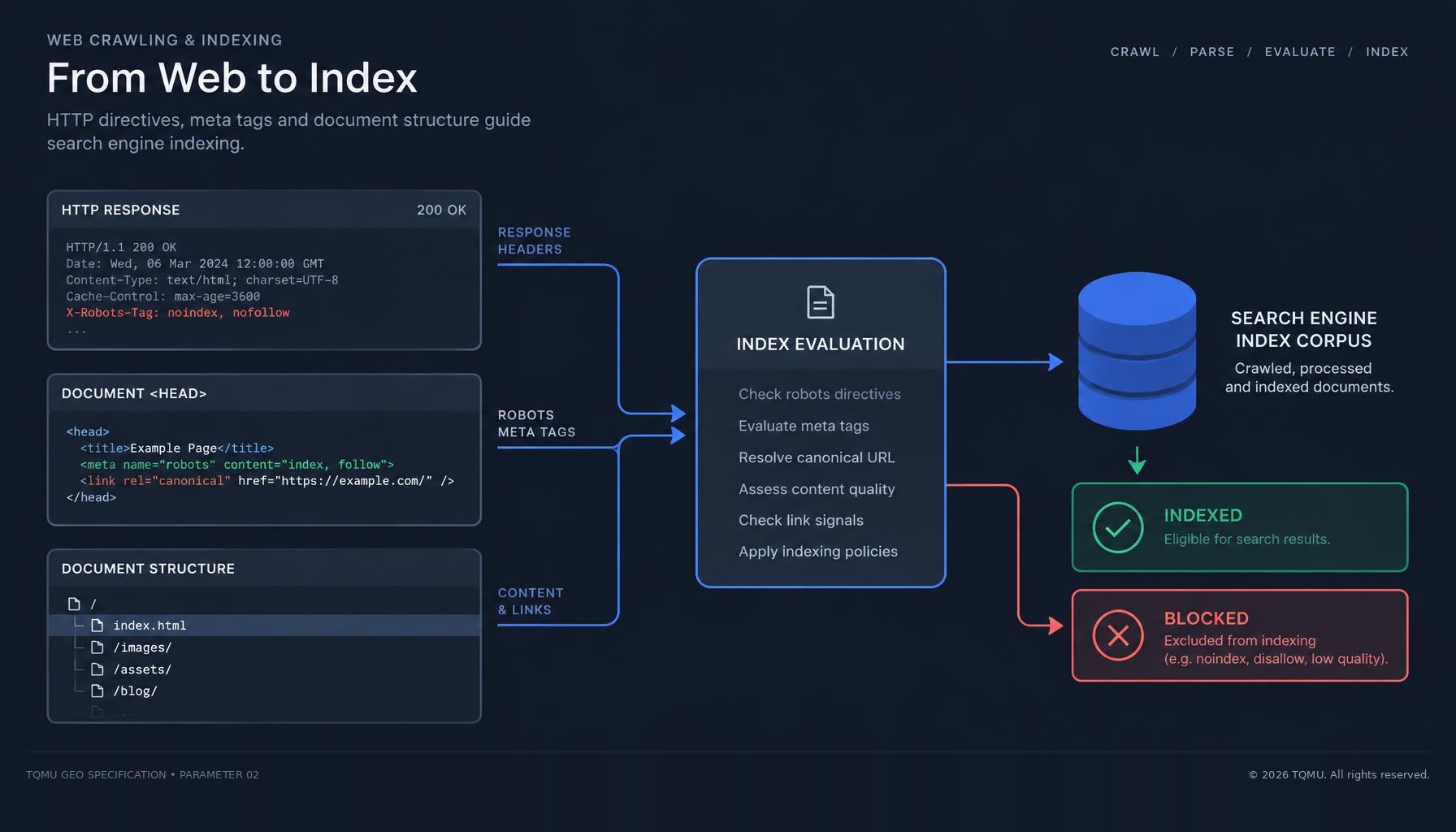
A page can return 200 OK and look perfect in a browser, yet still tell crawlers not to index it. The usual causes are a stray noindex meta tag, an X-Robots-Tag HTTP header set by a server or CDN, or a robots.txt rule that stops crawlers from ever seeing the directive. If a page is not indexed, AI search engines that retrieve from those indexes cannot cite it.
- Check both the HTML
<meta name="robots">tag and theX-Robots-Tagresponse header on every public template. - Do not block a page in robots.txt if you want crawlers to read its
noindex. A blocked crawler cannot see the directive. - When directives conflict, crawlers apply the most restrictive one.
Why indexability matters for generative engines
AI answer engines such as ChatGPT search, Perplexity, Copilot and Google AI Overviews ground many answers in pages fetched from a search index or a live retrieval step. If your page is excluded from the index, it is usually excluded from the pool of sources an answer can cite. Crawler access (robots.txt) decides whether a bot may fetch a page. Indexability decides whether the fetched page may be stored and shown.
The three places a noindex can hide
| Signal | Where it lives | Typical accidental cause |
|---|---|---|
| Robots meta tag | HTML <head> | A staging setting left on after launch, or a CMS "discourage search engines" checkbox |
| Crawler-specific meta tag | HTML <head>, for example name="googlebot" | A plugin targeting one crawler that nobody remembers adding |
X-Robots-Tag header | HTTP response headers | A server, CDN or edge rule applied to a whole path or file type |
Header directives are the hardest to spot because they never appear in the page source. Google documents that any directive usable in the robots meta tag can also be sent as an X-Robots-Tag header, which makes it useful for PDFs and images, and easy to apply too broadly.
How conflicts are resolved
When several directives apply, Google states that it uses the most restrictive one. A page carrying index in its meta tag and noindex in its header is treated as noindex.
The most common conflict involves robots.txt. If robots.txt disallows a URL, compliant crawlers never fetch it, so they never see its noindex. The URL can still appear in results without a description when other sites link to it. To remove a page from the index, allow crawling and serve noindex. To keep a page indexed, remove both blocks.
Audit workflow
- List your public templates. Home, article, product, category and landing pages usually cover most URLs.
- Check the response headers. Fetch each template and look for
X-Robots-Tag. - Check the rendered HTML. Search the
<head>forrobotsand crawler-specific meta tags, including tags injected by JavaScript. - Cross-check robots.txt. Confirm none of the pages you want indexed are disallowed.
- Confirm with the search engine. Use the URL Inspection tool in Google Search Console and the equivalent in Bing Webmaster Tools.
# Show only the robots header for a page
curl -sI https://YOUR-DOMAIN.COM/YOUR-PAGE/ | grep -i x-robots-tag

# Fetch as a search crawler to catch user-agent specific rules
curl -sI -A "Mozilla/5.0 (compatible; bingbot/2.0; +http://www.bing.com/bingbot.htm)" https://YOUR-DOMAIN.COM/YOUR-PAGE/

# Find robots meta tags in the HTML
curl -s https://YOUR-DOMAIN.COM/YOUR-PAGE/ | grep -io '<meta[^>]*name="[^"]*bot[^"]*"[^>]*>'
Correct configurations
For a public page you want indexed and cited, you do not need a robots meta tag at all. Indexing is the default. If your CMS requires one, use:
<meta name="robots" content="index, follow, max-snippet:-1">For private areas such as dashboards or account pages, send the header from the server so it covers every response:
# nginx example
location /YOUR-PRIVATE-PATH/ {
    add_header X-Robots-Tag "noindex, nofollow" always;
}
Note that max-snippet:0 and nosnippet limit how much text a search engine may show. Google documents that these controls also apply to its AI features, so use them only where you intend to restrict quoting.
Common antipatterns
- Shipping a staging-wide
X-Robots-Tag: noindexrule to production. - Blocking a URL in robots.txt and expecting its
noindexto work. - Adding
noindexto paginated or filtered pages that hold your only copy of key content. - Setting
noindexin JavaScript after load, so crawlers see different signals depending on whether they render. - Using
nosnippetsitewide, which leaves engines nothing to quote.
References
- Google Search Central, "Robots meta tag, data-nosnippet, and X-Robots-Tag specifications." developers.google.com
- Google Search Central, "Block search indexing with noindex." developers.google.com
- Koster, M., Illyes, G., Zeller, H. and Sassman, L. (2022). RFC 9309: Robots Exclusion Protocol. IETF. rfc-editor.org
- Fielding, R., Nottingham, M. and Reschke, J. (2022). RFC 9110: HTTP Semantics. IETF. rfc-editor.org
- Aggarwal, P. et al. (2023). "GEO: Generative Engine Optimization." arXiv:2311.09735. arxiv.org
Frequently asked questions
Can a page load normally but still be blocked from indexing?
- Yes. A page can return 200 OK in a browser while a robots meta tag or an X-Robots-Tag HTTP header tells crawlers not to index it.
What is the X-Robots-Tag header?
- It is an HTTP response header that carries the same directives as the robots meta tag, such as noindex. It never appears in the page source, so check it with a header tool or curl -I.
Should I block a page in robots.txt and add noindex?
- No. If robots.txt blocks a page, crawlers cannot fetch it and never see the noindex. Allow crawling and serve noindex to remove a page, or remove both to keep it indexed.
What happens when indexing directives conflict?
- Google applies the most restrictive directive. A page with index in its meta tag and noindex in its header is treated as noindex.
Does noindex affect AI search citations?
- Usually yes. AI answer engines often ground answers in pages from a search index, so a page excluded from the index is rarely available to cite.
About the author
J. Pannu · Founder
Full-stack online marketing professional. Simultaneously placed multiple websites in the top, most visited sites in the world.
Keep reading
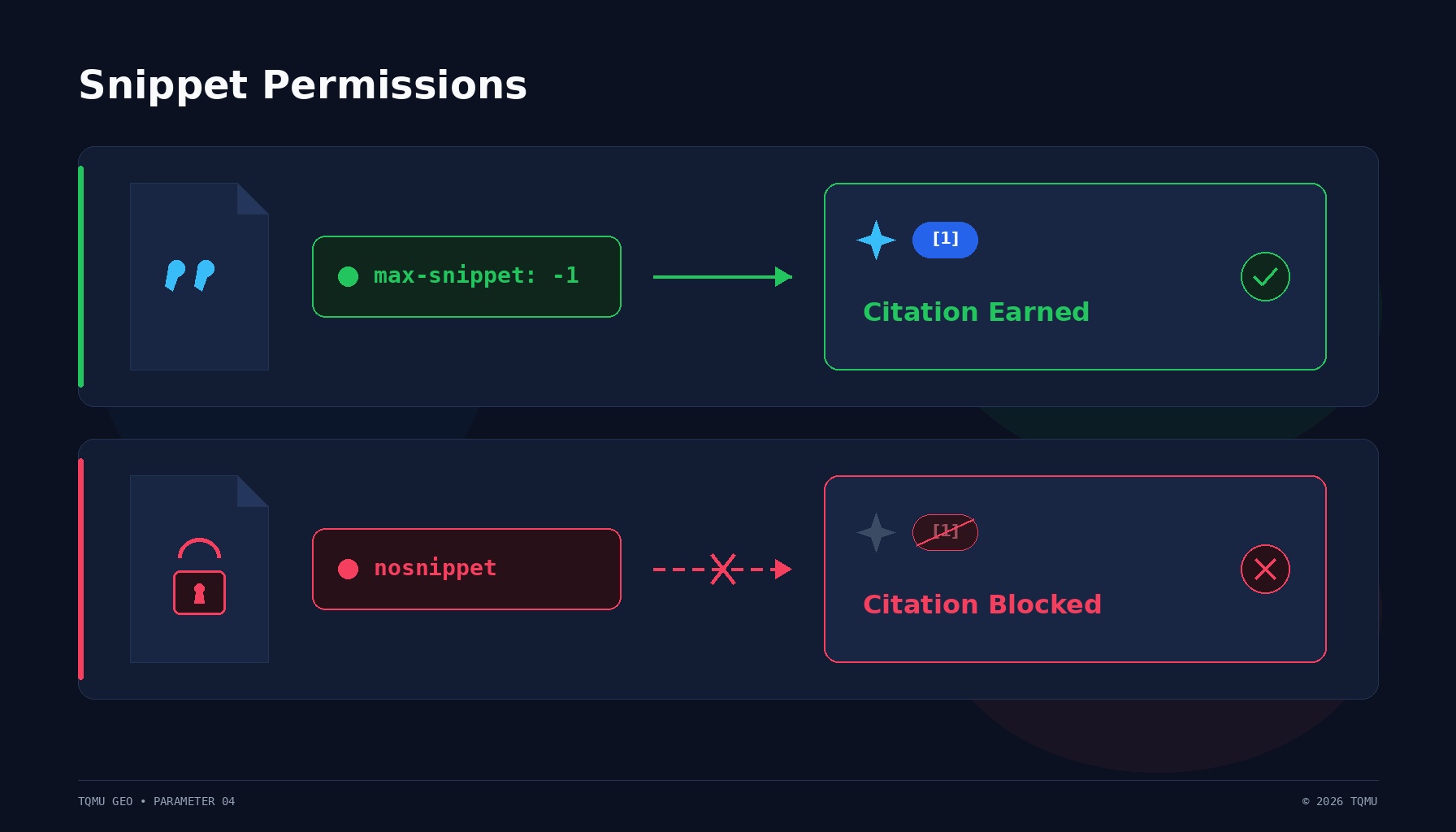
Snippet Permissions for Generative Engines: Managing nosnippet, max-snippet, and data-nosnippet
Restrictive snippet rules can stop AI search engines from quoting pages that are still indexed. How nosnippet, max-snippet and data-nosnippet work, how conflicts resolve, and how to audit them.
Nov 11, 2026 · 9 min read
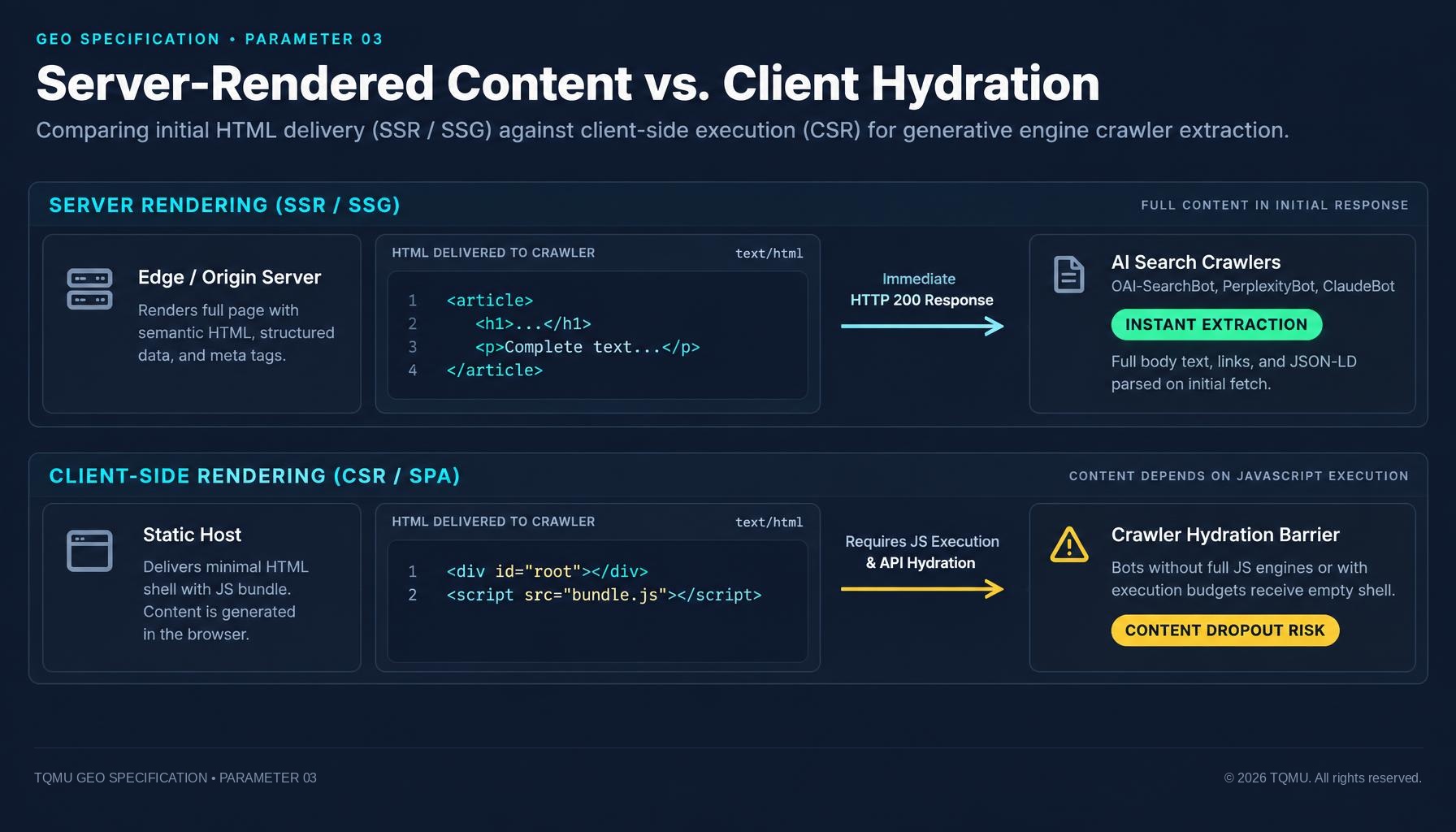
Server-rendered content vs. client hydration: why AI bots can miss JavaScript sites
If your main content appears only after JavaScript runs, some crawlers may see an empty page shell. How SSR, static generation and hydration affect what search and AI crawlers can read, and how to test what your server sends.
Nov 11, 2026 · 10 min read
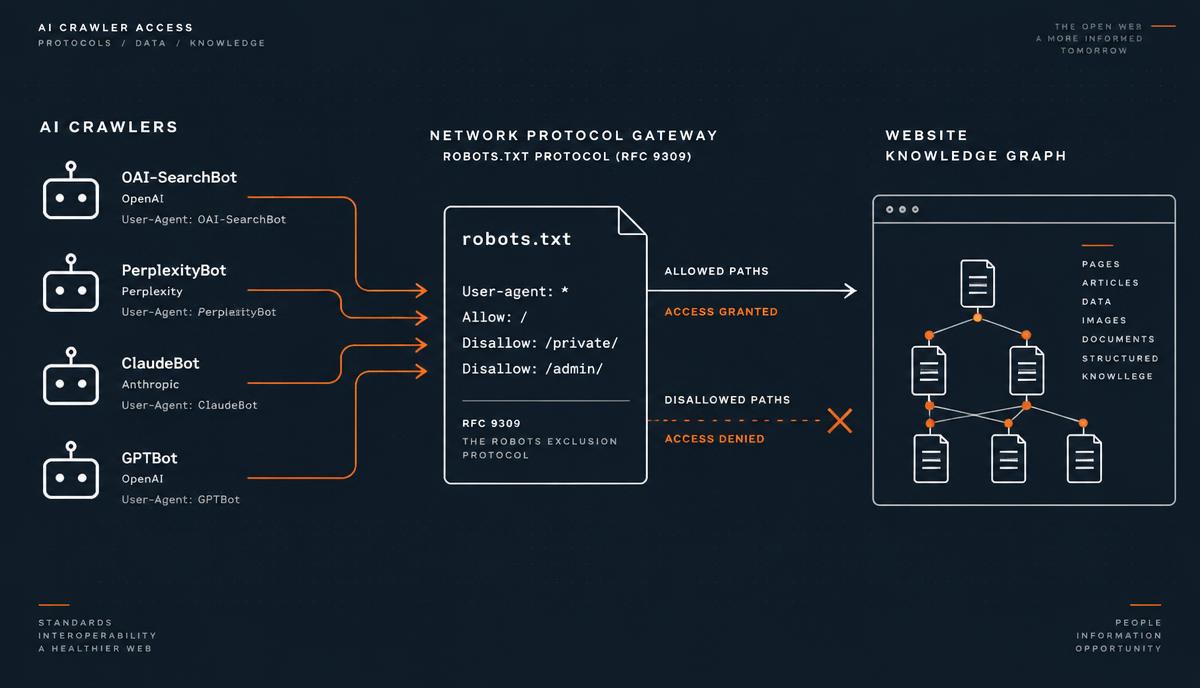
AI Crawler Access & robots.txt: Technical Guide to GPTBot, ClaudeBot, and PerplexityBot Indexation
How AI search engines like ChatGPT, Claude and Perplexity crawl the web, how RFC 9309 rules work, and how to configure robots.txt to maximize citation frequency while protecting sensitive endpoints.
Nov 10, 2026 · 8 min read