Server-rendered content vs. client hydration: why AI bots can miss JavaScript sites
If your main content appears only after JavaScript runs, some crawlers may see an empty page shell. How SSR, static generation and hydration affect what search and AI crawlers can read, and how to test what your server sends.
By J. Pannu · · 10 min read
Editorial note: This guide distinguishes official search-engine documentation from limited industry measurements of AI crawlers. Crawler behavior changes; verify the pages and user agents that matter to your organization before relying on a specific capability.
The short answer
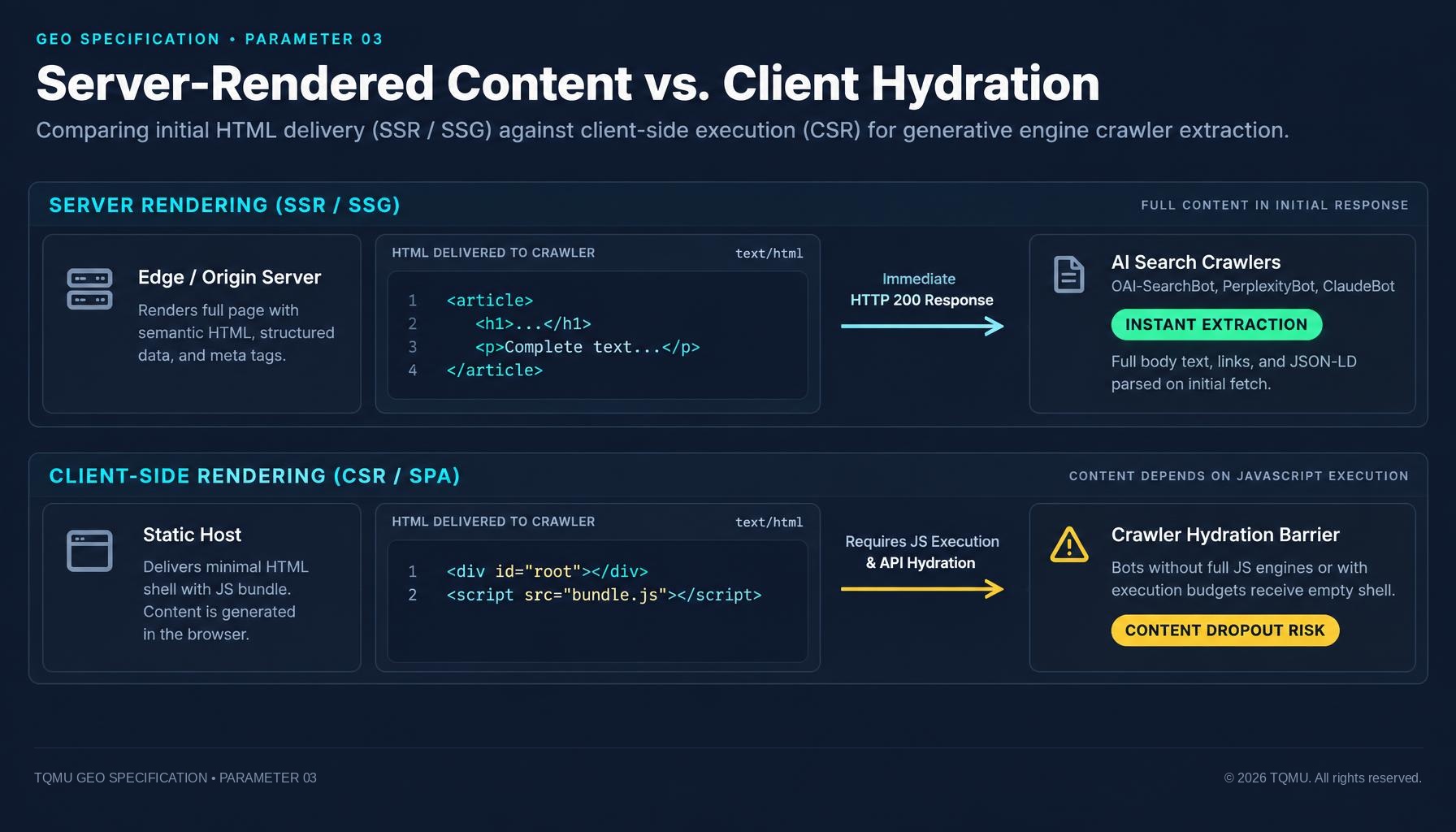
If your important page content appears only after JavaScript runs in a visitor’s browser, some crawlers may receive little more than an empty page shell. Google documents a crawl, render, and index process and can render JavaScript, but that does not establish that every search or AI crawler behaves the same way. For resilient discovery, deliver the page’s main text, title, links, and metadata in the initial HTML response, then use JavaScript to add interactivity rather than to reveal the only copy of the content.
This is a robustness recommendation, not a guarantee of indexing, ranking, retrieval, or citation. Each provider makes its own decisions, and the available evidence for AI crawlers is less complete than Google’s public documentation.
What server rendering and client rendering mean
A web page starts with an HTTP response. Its HTML may already contain the important page content, or it may contain a small application shell that asks JavaScript to fetch and construct the content later.
- Server-side rendering (SSR): The server generates HTML for a request and sends it to the browser. The delivered document can contain the main page content before browser JavaScript runs.
- Static generation (SSG): A build process creates HTML ahead of a request. A web server or content delivery network then serves those files. For a visitor or crawler, the key point is the same: useful content is present in the HTML response.
- Client-side rendering (CSR): The browser runs JavaScript to create or fetch the main page content after receiving an initial document. A pure client-rendered page may initially contain an empty root element and script references.
- Hydration: JavaScript connects interactive behavior to HTML that was already rendered. Hydration can make a server-rendered page interactive without making its initial content dependent on JavaScript.
- Incremental or mixed rendering: A page can send its core text in HTML and load optional, personalized, or interactive elements later.
These approaches can be combined. A single-page application does not automatically mean client-only rendering, and using React, Vue, or another JavaScript framework does not decide whether the initial response contains meaningful content. MDN describes server-side rendering as generating HTML on the server and client-side rendering as generating HTML in the browser; it also notes that both methods can be combined. MDN: SSR MDN: CSR
Why the first HTML response matters
A browser may show a complete page after it has downloaded scripts, fetched data, and run code. That visual result is not necessarily what every crawler receives or processes. Crawlers differ in whether they execute JavaScript, which resources they fetch, how they render a page, and when they revisit it.
Google documents three stages for JavaScript pages: crawling, rendering, and indexing. Its documentation says Google Search runs JavaScript, but also explains that rendering is a separate stage and that pages may have JavaScript-related problems that keep content from appearing in rendered HTML. Google recommends testing with its URL Inspection or Rich Results tools rather than assuming that the browser view is sufficient. Google Search Central: JavaScript SEO basics Google: Fix search-related JavaScript problems
For other crawlers, avoid turning a measurement into a universal rule. A Vercel and MERJ report published in December 2024 described observed behavior from Vercel’s network and a small set of sites. The authors reported that the major AI crawlers they examined generally did not render JavaScript, while Googlebot and Applebot did. That is useful evidence about the tested crawlers at that time, not a permanent guarantee about every provider, bot, or current implementation. OpenAI’s and Perplexity’s current crawler pages document user-agent purposes and access controls, but do not promise a general JavaScript-rendering capability. Vercel and MERJ: The rise of the AI crawler OpenAI crawler overview Perplexity crawler documentation
A practical rendering comparison
| Delivery pattern | What a basic HTML fetch may contain | Practical implication |
|---|---|---|
| Server-rendered page | Main text, headings, links, and metadata | Useful content is available without waiting for browser JavaScript. |
| Static-generated page | The same core page content, generated at build time | A strong option for content that does not need per-request rendering. |
| Client-rendered shell | App root, scripts, and perhaps a loading label | A crawler that does not execute JavaScript may not see the actual content. |
| Server-rendered page with hydration | Core HTML first; scripts add behavior afterward | Supports interactive features while preserving an informative initial document. |
| Mixed rendering | Core content in HTML; optional details loaded later | Keep answers and essential links in the response; test deferred sections. |
How this affects generative search visibility
Generative engines may use different sources and retrieval pipelines. Some systems are tied to a search index; others may fetch a page in response to a user request or use additional sources. Being indexable or readable is only one step in those processes.
The scholarly GEO paper by Aggarwal and co-authors describes generative engines as systems that synthesize information from multiple sources to produce answers. It does not establish that server rendering causes citations, nor does it measure a guaranteed benefit from SSR. The defensible takeaway is narrower: if a system’s crawler cannot access a page’s useful content, that content is harder for that system to evaluate or retrieve through that crawl path. Aggarwal et al., “GEO: Generative Engine Optimization,” ACM SIGKDD 2024
A readable initial HTML response can help with more than crawlers. It can improve resilience when scripts fail or load slowly, give link previews and other basic consumers a useful document, and reduce dependence on a multi-request client-side sequence. The exact performance result depends on the application, server, cache, and page weight; SSR is not automatically faster in every situation. MDN: SSR
A simple before-and-after example
A purely client-rendered page might send an initial response like this:
<!doctype html>
<html lang="en">
  <head>
    <title>Example service</title>
    <script type="module" src="/assets/app.js"></script>
  </head>
  <body>
    <div id="root"></div>
  </body>
</html>
The page title exists, but the service description, article text, and internal links do not appear until the app runs. If a crawler reads only the initial HTML, it has little substantive content to work with.
A server-rendered or statically generated version can put the essential content in the response:
<!doctype html>
<html lang="en">
  <head>
    <title>Example service | Example Company</title>
    <meta name="description" content="A concise description of the service.">
    <link rel="canonical" href="https://www.example.com/services/example/">
  </head>
  <body>
    <main>
      <h1>Example service</h1>
      <p>A clear explanation of what the service does and who it helps.</p>
      <a href="/services/related/">Explore the related service</a>
    </main>
    <script type="module" src="/assets/app.js"></script>
  </body>
</html>
JavaScript can still hydrate the page, open menus, update a calculator, or load optional material. The core explanation and useful links are already present.
What should appear in the initial HTML?
For each important public page, aim to include the content necessary to understand its purpose without interacting with the page:
- A unique, descriptive
<title>and a clear primary heading. - The core explanation, product or service details, or article body.
- Important internal links as standard HTML links with a meaningful
href. - Page-specific metadata, including the description and canonical URL where appropriate.
- Any essential structured data that accurately describes visible page content.
- A stable response and a sensible fallback for failures in optional scripts or APIs.
Not every component needs SSR. Account controls, live dashboards, maps, search filters, and private user-specific data may need browser-side behavior. The goal is not “no JavaScript.” The goal is to avoid making essential public information unavailable until JavaScript succeeds.
Common patterns that hide content
An empty app root
A framework returns an empty <div> or a generic loading state, then JavaScript fetches the whole page from an API. This may work for visitors with capable devices and a healthy network, but it makes content discovery depend on script execution and successful data requests.
Content depends on a user action
A section appears only after a click, scroll, hover, or other interaction. Google notes that its Search systems do not interact with pages as a person would. If content matters, make it available through the initial HTML or through crawlable links and stable URLs. Google: Fix lazy-loaded content
Hydration replaces correct content with a blank state
A server sends useful markup, but a hydration error or mismatched client state removes it or replaces it with an error message. Test both the initial response and the browser-rendered page; success in one view does not guarantee success in the other.
Important text loads from a blocked or fragile API
The HTML shell may be present while the browser fetches content from an API that requires a cookie, blocks automated requests, fails intermittently, or has restrictive cross-origin settings. If the page is public, consider rendering the essential content on the server or generating it at build time.
Lazy loading waits for a scroll event
Lazy loading can be useful, but a page should not require a visitor or crawler to scroll or click before it exposes essential content. Google recommends loading relevant lazy content when it becomes visible and testing that behavior. Use distinct URLs for paginated content rather than relying on an endless scroll with no crawlable continuation. Google: Fix lazy-loaded content
Metadata exists only after JavaScript runs
If title, description, canonical, or structured data appears only after client-side code executes, some consumers may miss it. Put page-specific metadata in the response where the framework supports it, and verify the final rendered output as well.
How to test what your server sends
1. Fetch the initial HTML
Replace the example URL with a page you manage:
curl -sS -L 'https://www.example.com/important-page/' -o /tmp/page.html
Search for expected text and headings:
grep -iE '<title>|<h1|your expected phrase|href=' /tmp/page.html | head -40
This quick check is not a complete HTML parser. It can still tell you whether obvious content is in the raw response or appears to be absent.
2. Check the status, final URL, and response headers
curl -sS -L -D - -o /dev/null \
  'https://www.example.com/important-page/'
Review the final response status, redirects, caching behavior, content type, and any access restrictions. For an indexability check, also inspect any X-Robots-Tag response header. A successful 200 response by itself does not prove the page contains useful text.
3. Compare raw and rendered content
Open the page in a browser with JavaScript enabled. Compare its main text, headings, links, and metadata with the raw HTML response. Then disable JavaScript and reload. If the page becomes empty or loses the main explanation, it relies heavily on client rendering.
This is a diagnostic signal, not a substitute for testing a particular crawler. Browser developer tools, frameworks, and rendered output can differ from the request made by an external service.
4. Use provider-specific inspection tools
For Google, use Search Console’s URL Inspection and Google’s JavaScript testing guidance to inspect rendered output and errors. Google’s documentation emphasizes that its JavaScript processing has stages and recommends testing rather than assuming. Google Search Central: JavaScript SEO basics Google: Fix search-related JavaScript problems
For other engines, use the tools and documentation they publish. Don’t infer that a bot executes JavaScript from its user-agent string, the scripts it downloads, or the fact that the page looks complete in your own browser.
5. Review real request logs carefully
Server logs can show which URLs, scripts, and data endpoints a crawler requests. Before changing bot rules or firewall settings, validate crawler identity using the provider’s documented methods, such as published IP information where available. User-agent strings alone can be forged and should not be treated as proof of identity.
Implementation choices
Option A: Server-side rendering
Generate the page HTML in response to each request. This can fit pages with frequently changing or request-specific content. Consider server capacity, cache behavior, latency, and safe handling of user-specific data. Do not accidentally embed private information in publicly cacheable HTML.
Option B: Static generation
Pre-render pages during a build and serve the resulting HTML through a web server or CDN. This works well for articles, guides, product pages, and other content that can be prepared ahead of time. Plan how edits trigger rebuilds and how frequently updated content is refreshed.
Option C: Hybrid rendering
Render the page’s core content on the server or at build time, then hydrate interactive controls and load nonessential details in the browser. This often offers a practical balance between accessible content and rich application behavior.
Option D: Dynamic rendering only when there is a specific need
Google describes dynamic rendering as a workaround rather than its preferred long-term solution, and recommends server-side rendering, static rendering, or hydration instead. Dynamic rendering also adds operational complexity because the server must detect crawlers and maintain equivalent versions. Avoid user-agent-based content differences that change the meaning of a page; crawler and visitor versions should represent the same public content. Google: Dynamic rendering as a workaround
A framework-neutral release checklist
Before shipping a significant public page, confirm:
- The initial HTML contains the main heading and the page’s essential text.
- Important links are present as normal links with valid destinations.
- Title, description, canonical, and relevant structured data match the page.
- The page remains useful if an optional script fails or is delayed.
- Lazy-loaded content does not require a click or scroll to become discoverable.
- Server-rendered markup and hydrated browser output agree on the core content.
- The page returns a successful response to the crawlers and users you intend to reach.
- Provider-specific testing tools show the expected rendered result where available.
- Logs and crawler identity checks are reviewed without treating a user-agent string as authentication.
Conclusion
A complete-looking browser page does not prove that every crawler receives its content. Make essential public information available in the initial HTML, use JavaScript to enhance rather than gate that content, and test the actual response alongside the rendered page. This improves technical resilience, while leaving indexing and citation decisions where they belong: with each provider’s systems.
References
- Google Search Central. Understand JavaScript SEO basics.
- Google Search Central. Fix search-related JavaScript problems.
- Google Search Central. Dynamic rendering as a workaround.
- Google Search Central. Fix lazy-loaded content.
- MDN Web Docs. Server-side rendering (SSR).
- MDN Web Docs. Client-side rendering (CSR).
- Zecchini, G., Moore, A. A., Ubl, M., & Siddle, R. The rise of the AI crawler. Vercel, 17 December 2024.
- OpenAI. Overview of OpenAI crawlers.
- Perplexity. Perplexity crawlers.
- Aggarwal, P., Murahari, V., Rajpurohit, T., Kalyan, A., Narasimhan, K., & Deshpande, A. GEO: Generative Engine Optimization. Proceedings of the 30th ACM SIGKDD Conference on Knowledge Discovery and Data Mining, 2024.
Editorial note: Search documentation and crawler behavior can change. Recheck provider guidance and test important URLs before publication. Code examples use www.example.com and are illustrative; replace them with a domain and paths you manage.
Frequently asked questions
Does Google require server-side rendering?
- No. Google documents that it can render JavaScript. However, its processing includes a distinct rendering stage, and the documentation describes limitations and recommends testing. Server rendering or static generation can reduce dependence on that rendering step, but it does not guarantee that Google will index or rank a page.
Do all AI crawlers ignore JavaScript?
- No universal statement is justified. A Vercel and MERJ study published in December 2024 reported limited observations of major crawlers on the sites and network they examined. Providers can change their systems, and published crawler documentation may not specify rendering capabilities. Put critical public content in the initial HTML and test the platforms that matter to you.
Is a React or single-page site automatically invisible to crawlers?
- No. Framework choice does not determine whether meaningful HTML is sent first. React and other frameworks can be configured for server rendering, static generation, or client-side rendering. Inspect the actual response for your page.
Does hydration make content client-rendered?
- Not necessarily. Hydration adds client-side behavior to HTML that may already contain the page’s content. If the server response contains the main text and headings, a crawler that does not run JavaScript can still read that initial content.
Should every page be server-rendered?
- Not always. Private dashboards and highly interactive tools may need client-side application behavior. Prioritize public, important pages whose discoverability matters, then select SSR, static generation, or a hybrid approach based on the content and update cycle.
Will SSR make my page appear in AI answers?
- No. SSR can make content available in the initial response, but it cannot guarantee that a particular engine crawls, indexes, retrieves, trusts, or cites the page. Content quality, access rules, provider-specific systems, and query relevance still matter.
Is dynamic rendering the best fix for JavaScript-heavy pages?
- Usually not as a default. Google describes dynamic rendering as a workaround and recommends server-side rendering, static rendering, or hydration as longer-term approaches. Consider dynamic rendering only when there is a specific compatibility need and a sound plan to keep crawler and user content equivalent.
About the author
J. Pannu · Founder
Full-stack online marketing professional. Simultaneously placed multiple websites in the top, most visited sites in the world.
Keep reading
Snippet Permissions for Generative Engines: Managing nosnippet, max-snippet, and data-nosnippet
Restrictive snippet rules can stop AI search engines from quoting pages that are still indexed. How nosnippet, max-snippet and data-nosnippet work, how conflicts resolve, and how to audit them.
Nov 11, 2026 · 9 min read
Indexability Signals for Generative Engines: Eliminating Accidental noindex and Header Dropouts
A page can load normally for visitors while HTTP headers or meta tags tell search crawlers not to index it. How to audit noindex directives, resolve conflicts with robots.txt, and ensure AI engines can index and cite your public pages.
Nov 11, 2026 · 9 min read
AI Crawler Access & robots.txt: Technical Guide to GPTBot, ClaudeBot, and PerplexityBot Indexation
How AI search engines like ChatGPT, Claude and Perplexity crawl the web, how RFC 9309 rules work, and how to configure robots.txt to maximize citation frequency while protecting sensitive endpoints.
Nov 10, 2026 · 8 min read